Understanding DNS Records for Email Deliverability
A Simple Guide to SPF, DKIM, and DMARC
Email deliverability depends heavily on trust. When you send an email, receiving providers like Gmail or Outlook must decide whether your message is legitimate or potentially harmful. DNS records help them make that decision. This guide explains what key DNS records do, why they matter for inbox placement, and what happens when they are missing.
This article is purely educational and does not require you to change or configure anything.
What DNS Records Do for Email
DNS records act as public instructions for how your domain handles email. They allow receiving servers to verify that your emails are authorized, authentic, and unaltered. Without these records, email providers have little reason to trust messages coming from your domain.
For email deliverability, the most important records are SPF, DKIM, and DMARC.
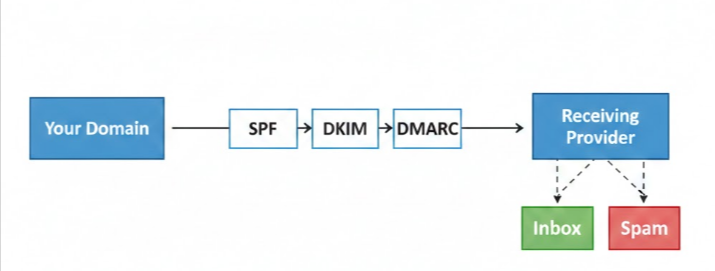
Understanding SPF
SPF (Sender Policy Framework) defines which mail servers are allowed to send emails on behalf of your domain. When an email is received, the provider checks the SPF record to confirm that the sending server is authorized.
If the server is listed in the SPF record, the check passes. If it is not, the email may be marked as suspicious or rejected entirely. SPF helps prevent spoofing, where attackers attempt to send emails pretending to be from your domain.
Understanding DKIM
DKIM (DomainKeys Identified Mail) adds a digital signature to every outgoing email. This signature allows receiving servers to verify that the message was not modified after it was sent and that it truly originated from your domain.
DKIM builds trust by proving message integrity. Even if the content looks legitimate, missing or broken DKIM signatures can reduce inbox placement because providers cannot confirm the email’s authenticity.
Understanding DMARC
DMARC (Domain-based Message Authentication, Reporting, and Conformance) tells receiving servers what to do when SPF or DKIM checks fail. It also allows domain owners to receive reports about how their emails are being handled.
DMARC connects SPF and DKIM together and defines a clear policy. It helps protect your domain from abuse and gives providers confidence that you actively manage your email authentication.
Why These Records Matter for Inboxing
Email providers rely on SPF, DKIM, and DMARC to decide where your emails should land. When these records are present and aligned, providers are more likely to deliver emails to the inbox instead of spam.
Proper authentication helps with:
Building sender reputation
Preventing spoofing and phishing
Improving inbox placement consistency
Reducing the chance of email rejection
In short, authenticated emails are trusted emails.
The Role of MX Records
MX (Mail Exchange) records define where incoming emails for your domain should be delivered. While MX records do not directly authenticate outgoing emails, they are essential for receiving replies and maintaining healthy email communication.
Missing or incorrect MX records can cause delivery failures, broken conversations, or lost replies, which negatively affects engagement and reputation over time.
What Happens If These Records Are Missing
When SPF, DKIM, or DMARC records are missing or misconfigured, email providers have no reliable way to verify your emails. As a result, your messages may be flagged as spam, routed to the junk folder, or rejected before delivery.
Common consequences include:
Poor inbox placement
Failed warm-up processes
Higher spam complaint rates
Reduced trust in your domain
Even well-written emails can fail if authentication is not in place.
Final Thoughts
DNS records are the foundation of email deliverability. While they operate behind the scenes, they play a major role in whether your emails reach the inbox or not. Understanding how SPF, DKIM, DMARC, and MX records work helps you make better decisions about email sending and protect your domain reputation in the long term.
Before focusing on volume, content, or campaigns, it’s always worth ensuring that authentication is understood and taken seriously.
Also check
What Is an SPF Record
DKIM: What, Why, and How to Set it up?
DMARC: What, Why, and How to Set it up?
Technical Checklist Before Starting Email Warm-up