How Does TrulyInbox Email Warm-up Work?
See how TrulyInbox email warm-up works to prepare your email account for better inbox placement.
Email providers do not automatically trust new or inactive email accounts.
Before placing emails in the Primary Inbox, they evaluate consistency, engagement, and behavioral patterns over time.
TrulyInbox warm-up builds that trust using real interactions.
This guide explains how it works, what you may notice, and what is required from you.
Why Trust Matters
When an account starts sending without history, providers treat it cautiously.
Without established trust, you may see:
Spam or Promotions placement
Reduced visibility and engagement
Sending limits or account restrictions
Warm-up introduces structured activity that signals legitimacy and stability.
How the Warm-up System Works
TrulyInbox operates through a real-user network.
This means:
Emails are exchanged between actual customer accounts
No bots or simulated inboxes are involved
Activity mirrors natural email behavior
Because interactions occur between real inboxes, engagement signals are authentic and provider-compliant.
Cross-Provider Reputation Building
Warm-up is not limited to a single platform.
Your account interacts with users across:
Google
Microsoft
Other major email providers
This builds reputation broadly, preparing your account for outreach across multiple recipient domains.
What Happens Automatically
Once enabled, the system:
Sends emails from your account
Opens and replies to messages
Applies engagement signals
Recovers emails from Spam when necessary
No manual action is required. Warm-up runs independently without affecting normal inbox usage.
What You May Notice
You may receive emails from unfamiliar senders.
This is expected. These messages are part of the warm-up network and exist only to generate engagement signals.
How to Identify Warm-up Emails
All warm-up emails contain a unique identifier:
Phone_N0:
(The eighth character is the number zero)
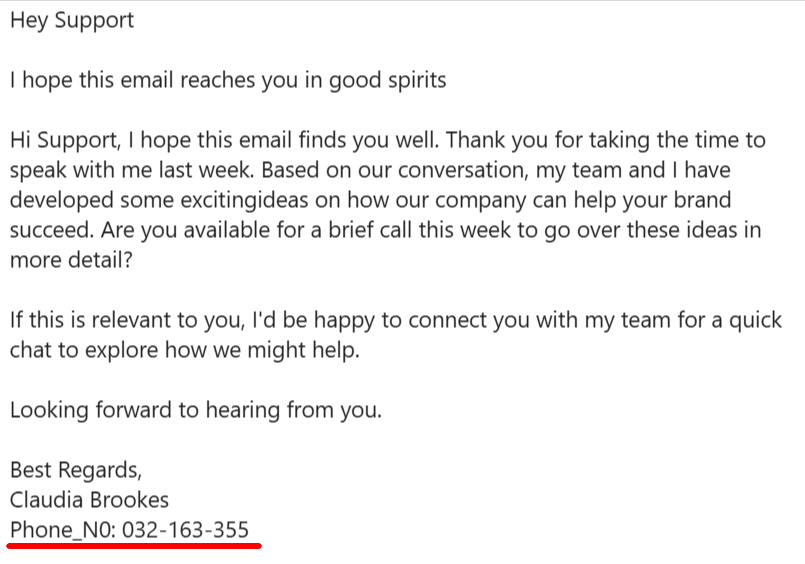
This makes it easy to distinguish warm-up emails from personal or outreach messages.
Filtering Warm-up Emails
If you prefer to keep warm-up emails separate, you can create a filter using:
Phone_N0:text
You may then apply a label such as “Warm-up Inbox” for organization.
Filtering is optional and does not affect warm-up performance.
What Warm-up Does Not Affect
To avoid confusion, warm-up activity:
Does not treat emails as prospects
Does not count replies as outreach replies
Does not trigger workflows or automations
Does not interfere with campaigns or sequences
Warm-up exists solely to improve sender reputation.
Key Takeaways
Warm-up builds trust using real email activity
All actions are automated and require no manual effort
Seeing unfamiliar emails during warm-up is expected
Warm-up is isolated from outreach and workflows
With consistent warm-up, your email account becomes safer, more stable, and more reliable for real outreach.
Also check
How Does TrulyInbox Email Warm-up Work?
How to filter warmup emails in your inbox or mailbox?
Inbox vs Spam How to Read Warm up Results in TrulyInbox
How much time should I enable email warmup?